
Set the aircraft you are planning for
Choose a built-in profile or create your own. Range, cruise speed, fuel burn, fuel capacity, and reserve all help shape the plan. AeroTrail supports profiles for fixed-wing aircraft and helicopters, with airport preferences you can adjust for your flying.
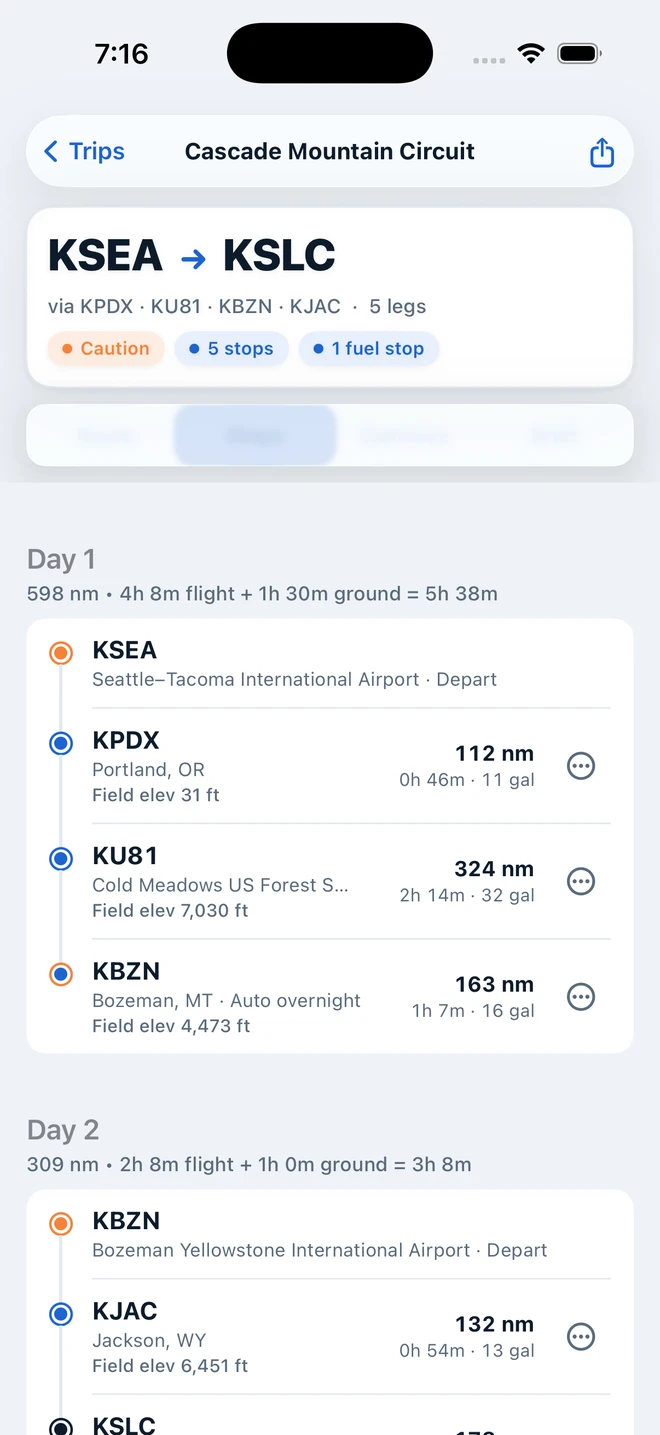
Review the stops between your destinations
AeroTrail can add suggested fuel stops when a leg exceeds the selected planning range. See each leg in the route list with distance, estimated flight time, and fuel estimates. Open a stop to review its airport and runway information.
Keep control as you refine the trip
Pin an important stop, mark it as an overnight, or choose airports to favor or avoid. When you add a destination or change the route order, optimize again to review a revised plan with fuel stops and flying days.
Review the assumptions before flight
Use Route Health to review planning notes and assumptions. Confirm actual fuel availability, airport suitability, aircraft performance, weather, and operational requirements with current sources as part of your normal preflight preparation.
See the fuel stops and the legs that connect your trip.
Buy AeroTrailPaid app. See the App Store for your local price.